Chat without internet, Wi-Fi or signal
GoFiChat is a free app for iPhone and Android that sends messages straight from one phone to another over Bluetooth, so a group of up to 8 people can chat with no internet at all. It works in airplane mode once Bluetooth is back on.
The short answer
- No internet, mobile data or Wi-Fi network needed. Phones connect to each other directly.
- Bluetooth reaches about 10 to 30 metres, so it's for people who are together: on the same flight, train, campsite or table.
- Up to 8 people in a room. iPhones and Android phones join the same one.
- Messages, photos, voice messages and stickers, and 16 games.
- End-to-end encrypted, with no accounts, phone numbers or servers.
- Free, with no ads and no in-app purchases. Install it while you still have internet.
Why your usual messaging app stops
Most messaging apps send through the internet. Apple's own page on iMessage says it sends over Wi-Fi or cellular data, and internet messengers work the same way: your message goes to the company's servers and from there to your friend. With no signal and no Wi-Fi, it sits on your phone until you're connected again, even if your friend is in the next seat. Plain text messages (SMS) need a mobile signal instead, so they stop too.
GoFiChat skips the servers. The phones in a room talk to each other over their own radios, so the connection only has to reach across the room, not to a cell tower.
How it works with no connection
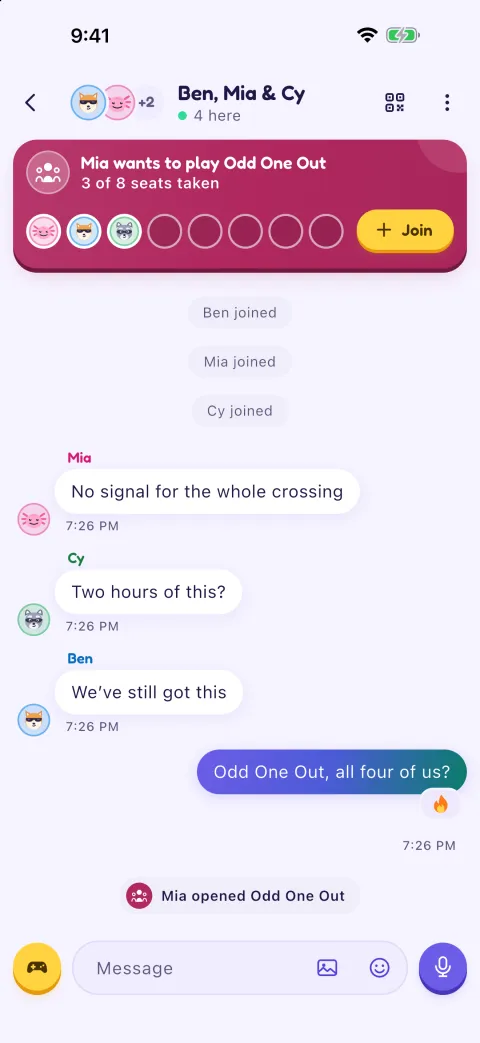
One phone starts a room and the others join it. They link over Bluetooth Low Energy, which every recent iPhone and Android phone has. One phone, at first the one that started the room, passes each message on to everyone else. If that person leaves, another phone takes over by itself and the room carries on.
If everyone is on the same Wi-Fi network or one phone's hotspot, GoFiChat uses that too, and it's faster. The network doesn't need to be connected to the internet.
When someone is a little out of reach of the phone the room runs through, another phone in the room can pass messages along for them, so a group spread along a train carriage or a campsite can stay in one room. Anyone who walks out of range is back in when they return, and the chat catches them up on what they missed.
What you need
- GoFiChat on every phone. Installing needs internet, so do it before the trip, and ask the people you're going with to do the same. If an Android friend forgot, the Play Store's Share apps feature can send it from another Android phone with no internet; GoFiChat shows the steps.
- Bluetooth on. Airplane mode can switch it off, so check it's on after you turn airplane mode on.
- Permission to use Bluetooth: on iPhone, Bluetooth and Local Network; on Android, Nearby devices, or Location on Android 11 and older, which needs it for Bluetooth. The app asks the first time. It doesn't use your location.
- Each other. Everyone needs to be within Bluetooth range of someone in the room, or on the same Wi-Fi or hotspot.
Start a chat with no signal
Start a room
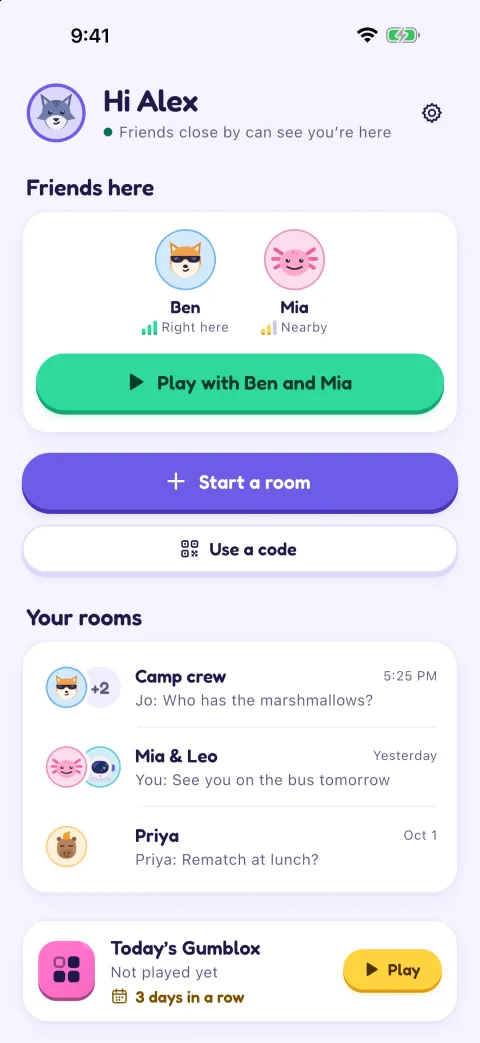
Tap Start a room. You get a QR code and a 6-digit code. Friends you've added before are invited with one tap.
Friends join
They scan your QR code with GoFiChat and come straight in. Or they type the 6-digit code, and you tap Let in after checking that both phones show the same pictures.
Chat
Send messages, photos, voice messages and stickers, reply to a message or react to it, and open a game for anyone who wants to play.
The room stays on everyone's phone. Next time you're together, open it again from Your rooms: your friends' phones see it nearby, and one tap brings them back in with the chat where you left it.
Where it helps
- Flights, where Wi-Fi is missing or costs extra. See games to play on a plane.
- Subways and underground trains, between stations with no coverage.
- Camping, hiking and road trips through places with no bars.
- Festivals and stadiums, where a crowd can leave everyone with a signal that doesn't carry data.
- Ferries and cruises, without paying for the ship's Wi-Fi to message the people next to you.
- Travelling abroad without a data plan, or saving data at home.
What it doesn't do
GoFiChat is for people who are together. It can't reach someone across town, so it doesn't replace texting or calling. A room holds 8 people. There are no voice or video calls, though voice messages work. And because there's no server, a message can only reach people who are in the room, or who come back into it.
Is it private?
Every link between phones is end-to-end encrypted (X25519 key exchange and ChaCha20-Poly1305) with keys made on the phones for that room. There are no accounts and no servers, so there's nothing for anyone at GoFiChat to read or store. Scanning the QR code also checks the room's key, so another phone can't pretend to be your room. Chats are kept on each phone, not in iCloud or Google backups, and you can turn chat history off. Read more on the privacy page.
Questions
Can you text without internet or signal?
Not with SMS or an internet messenger, which need a mobile signal or a data connection. With GoFiChat you can message people close by, because the phones connect directly over Bluetooth or a shared Wi-Fi network.
Does it work in airplane mode?
Yes, as long as Bluetooth is on. Turn on airplane mode, then switch Bluetooth back on. Follow your airline's rules and the crew's instructions about using Bluetooth in flight.
Can iPhone and Android phones chat together?
Yes. Both use standard Bluetooth Low Energy, so a room can mix iPhones and Android phones.
How far apart can we be?
Bluetooth usually reaches 10 to 30 metres, depending on walls, people and the phones. Another phone in the room can pass messages along for someone a little farther away. GoFiChat warns you when you're getting far from the others.
Does it use mobile data?
No. Chats and games go over Bluetooth or local Wi-Fi and never use your data plan. Installing the app is the only part that needs internet.
Do we need accounts or phone numbers?
No. You pick a name and an avatar, and that's it. Friends join by scanning your QR code or typing the room's code.
Read next
Get GoFiChat before you lose signal
Coming soon to the App Store and Google Play. It's free.
It's free. Installing needs internet, so get it before you set off, and send this page to whoever's coming with you.